


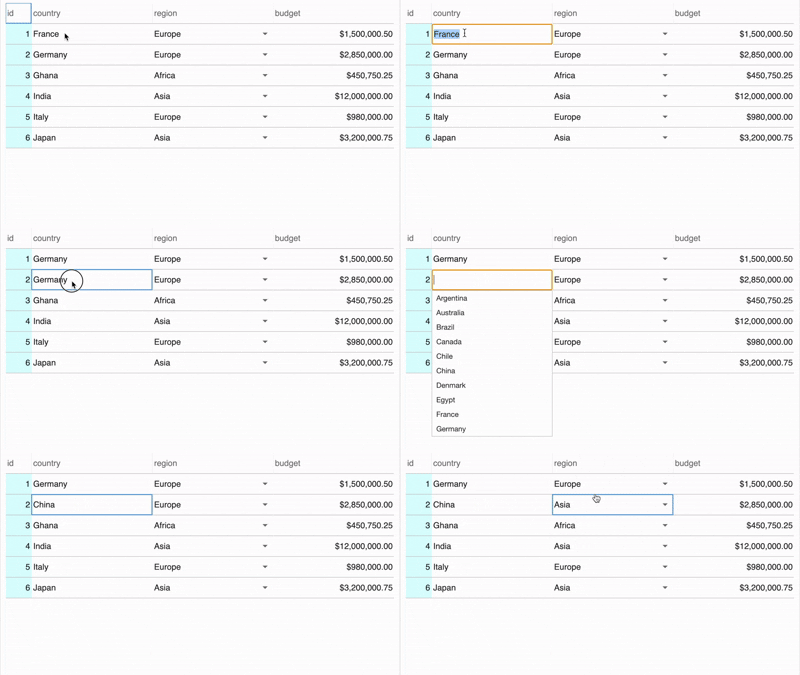
cheetahR 0.4.0 adds an autocomplete column for editable Shiny tables: it
filters a list of known suggestions as the user types, while still
letting them commit a value that isn’t on the list. The release also
ships a get_grid_data() Shiny helper and fixes a
renderCheetah() re-render bug.
Grab it from CRAN:
install.packages("cheetahR")
The autocomplete column
Editing values in a Shiny grid usually means picking between two extremes. Plain text input is fast to wire up but offers no hint about what the user should enter. A closed dropdown shows the valid options but turns unwieldy past about twenty entries. The new autocomplete column in cheetahR 0.4.0 lands somewhere in between. It filters a list of known suggestions as the user types, and still lets them commit a value that isn’t on the list when they need to.
You declare it on column_def() with action = "autocomplete" and pass
the pool of valid suggestions via auto_complete_opts. The underlying
data column has to be of class character:
library(cheetahR)

countries <- c("Argentina", "Brazil", "Canada", "France", "Germany",
               "Ghana", "India", "Italy", "Japan", "Mexico", "Nigeria",
               "Spain", "United Kingdom", "United States")

data <- data.frame(
  id = 1:6,
  country = c("France", "Germany", "Ghana", "India", "Italy", "Japan"),
  stringsAsFactors = FALSE
)

cheetah(
  data,
  editable = TRUE,
  rownames = FALSE,
  columns = list(
    country = column_def(
      action = "autocomplete",
      auto_complete_opts = countries
    )
  )
)
Once a user double-clicks a cell:
- Typing filters the suggestion list (case-insensitive, matches anywhere in the word).
- The dropdown shows at most 10 matches at a time so it stays snappy on big pools.
- ↑/↓ moves through the highlights; Enter or Tab commits the highlighted suggestion (or whatever they typed, if nothing is highlighted); Escape cancels.
- Setting
keyboard_options = list(moveCellOnTab = TRUE)oncheetah()makes Tab also advance to the next cell.
The cell fires the usual CHANGED_VALUE event when it commits, so the
new value flows into input$<id>_changed_value like any other editable
column.
Also new in 0.4.0
Two smaller pieces shipped alongside autocomplete:
-
get_grid_data()is a new Shiny helper that returns the full grid contents as a reactive data frame. Easier than reassembling the table from individual_changed_valueevents. - A render bug (#51) is
fixed:
renderCheetah()no longer stacks a new grid on top of the old one when its reactive deps change.
Pairing it with other column types
The autocomplete column works alongside cheetahR’s other interactive
columns. A natural pattern is to mix it with an inline_menu (for a
small, closed pick list) and a numeric column with a currency formatter:
columns = list(
  country = column_def(
    action = "autocomplete",
    auto_complete_opts = countries
  ),
  region = column_def(
    column_type = "menu",
    action = "inline_menu",
    menu_options = list(
      Africa = "Africa", Americas = "Americas",
      Asia = "Asia", Europe = "Europe", Oceania = "Oceania"
    )
  ),
  budget = column_def(
    name = "Budget",
    column_type = number_format(style = "currency", currency = "USD")
  )
)
The currency formatting comes from cheetahR’s
number_format()
helper, which wraps the browser’s Intl.NumberFormat.
Try it out
install.packages("cheetahR") to grab 0.4.0. Full release notes are in
NEWS.md. Bug
reports and feature requests are welcome on the issue
tracker.